You specify the intervention. UniState generates the motion and interactions that follow.
Specified: Move only the orange car toward the blue car.Generated: The blue car responds by taking a detour.Specified: Move only the bulldozer toward the rock.Generated: The rock moves as the bulldozer pushes it.Specified: Set only the cat’s torso trajectory.Generated: The model adds the leg movements for walking.
INTERVENTIONS IN ACTION
One state. Many ways to shape the world.
Control whole objects or selected parts, and explore the scene from different viewpoints. Videos show precomputed results.
Specified: Move the tractor behind the hay.Generated: The hay partially occludes the tractor as it passes behind it.Specified: Rotate only the excavator’s upper structure.Generated: The upper body turns independently of the tracks.Specified: Set the balloon’s trajectory in depth.Generated: The balloon moves closer to the camera.Specified: Choose a camera trajectory through the scene.Generated: The scene is revealed from changing viewpoints.Specified: Set motions for multiple chess pieces.Generated: Multiple pieces move along their assigned trajectories.
Overview
From a single image to an editable 3D state, an object intervention, and the generated result.
CONTINUED CONTROL ACROSS ROLLOUTS
Move the object. Move the camera. Then both.
First, move the excavator with the camera fixed. Next, move the camera while keeping the updated object pose. Finally, control both together. Each rollout continues from the preceding world state.
Object only→Camera only→Object + camera
Left: the world state and prescribed controls. Right: the generated video.
PERSISTENT SCENE CHANGES
Change the scene. Leave. Come back.
The controlled bulldozer pushes a rock. After the updated scene is stored in memory, the camera leaves and revisits the area: the rock remains in its displaced position.
THE CORE IDEA
Memory and intervention, in one shared 3D state.
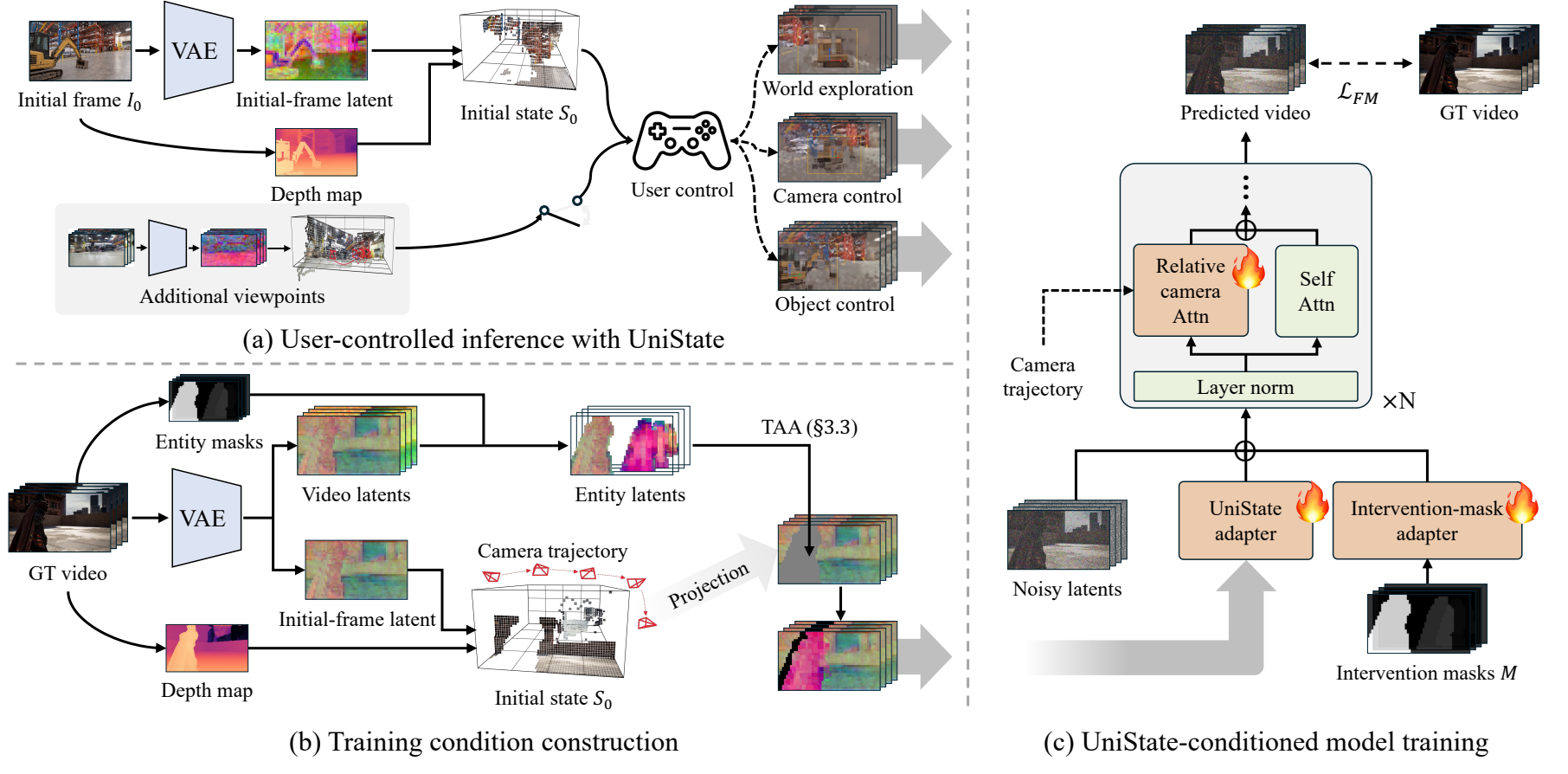
UniState lifts image latents into 3D to build spatial memory, and expresses object interventions by transforming selected regions within that same memory. The manipulated objects and the surrounding scene remain in a single world-state representation. Rendering this shared state along an independently chosen camera trajectory provides the conditions for video generation.
Scene-Anchored Joint Guidance and Transport-Aligned Augmentation help generated videos follow the specified object motion and camera trajectory.
UniState overview from the paper. (a) User-controlled inference; (b–c) training. Click the figure to enlarge.
See the paper for the full method and training details.
JOINT OBJECT & CAMERA CONTROL
Following object and camera controls together.
Qualitative comparisons
Compare UniState with five competing methods in synchronized playback. Green boxes mark target positions; XYZ axes mark target orientations.
Move the yellow robot forward and left while turning it; move the camera right. Compare the robot’s approach and heading under the viewpoint change.
Example 1 / 4UniState and five competing methods · shared playback
This example could not load. Try another example or reload the page.
Quantitative results
Results reported in the manuscript. Lower is better for all three metrics.
Comparison with competing methods
Method
WCPE (%) ↓
Cam-T ↓
Cam-R (°) ↓
VerseCrafter
3.039
0.0540
0.385
WorldDirector
2.487
0.0844
0.571
SymphoMotion
2.822
0.0627
0.526
MotionCanvas
2.425
0.0378
0.428
Real2SAM2Real
3.061
0.104
0.608
UniState (Ours)
2.323
0.0106
0.376
Explore more scenes
Choose a scene to explore three combinations of object motion and camera path.
Car & tree
Scene 1 / 10
Object motion 1 · Camera path 2Object motion 2 · Camera path 1Object motion 3 · Camera path 3
PAPER & RESOURCES
UniState
Unifying Memory and Intervention for Controllable World Simulation